
Using the API
DisplayNet accepts the same commands over four transports: telnet, SSH, a WebSocket session, and REST.
In this section
Three things hold for every transport:
- Choosing a transport: what each is for, and what is identical across all four
- Authentication and permissions: one user model, one set of roles, one login token
- Requests and Events: asynchronous replies and notifications, which behave the same way everywhere
The rest is transport-specific:
- TCI API: opening a session, initializing it, and the states it moves through
- REST API: bearer tokens, the two operation families, events, and the OpenAPI document
The Command Reference says what each command does; a command behaves the same whichever transport carries it. Each command page includes its REST form, and the command map lists every command in one table.
Building API commands with DisplayNet Manager
DisplayNet Manager uses the DisplayNet API exclusively for routing and configuration, and its Console tab shows every command it sends. The Console is also a place to try individual commands without opening a telnet session.
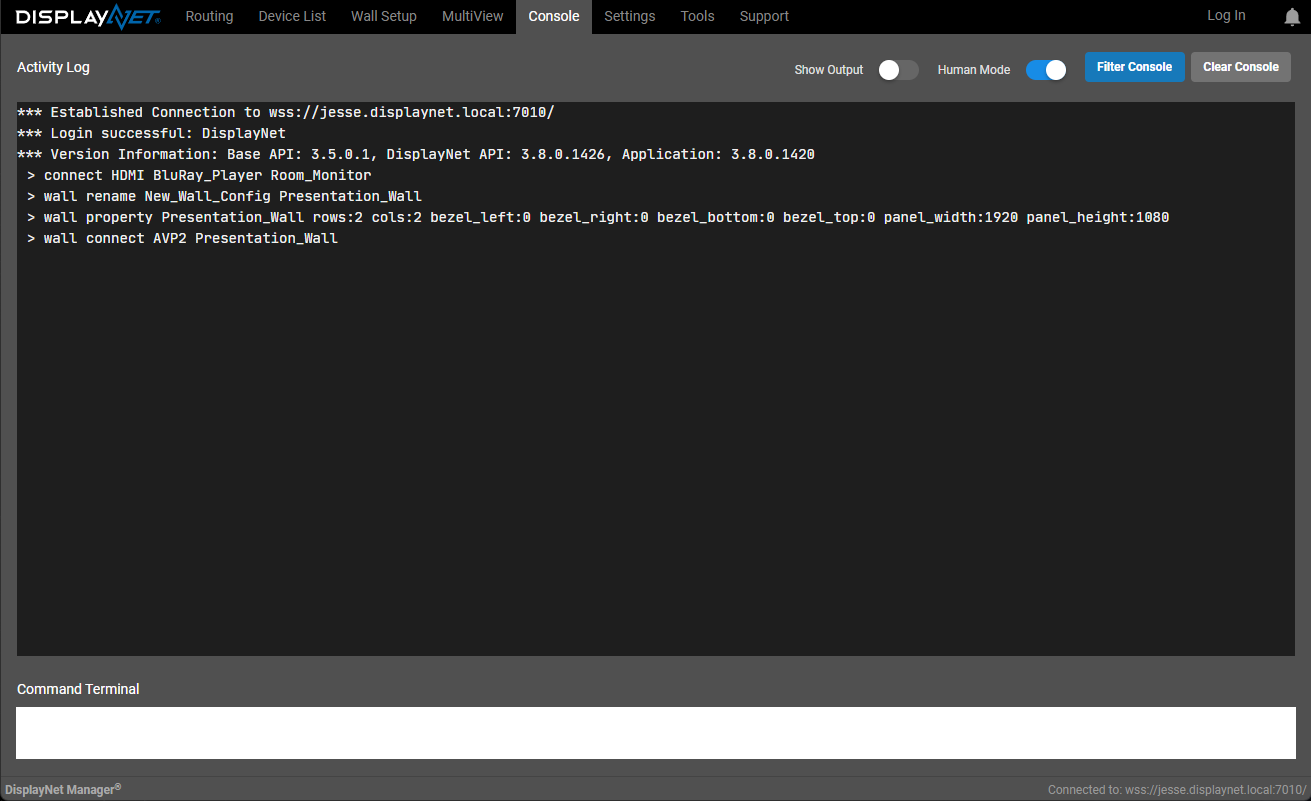
The Console logs all API commands issued by the software. Select Show Output to include the API's responses. Clear Console empties the log.
To capture a configuration as a script: clear the console, toggle off Show Output, then perform the tasks in the interface. The log then holds the commands needed to reproduce them. Copy the log into a text editor, strip the > prefix from each line, and the result runs in any telnet-compatible control system.